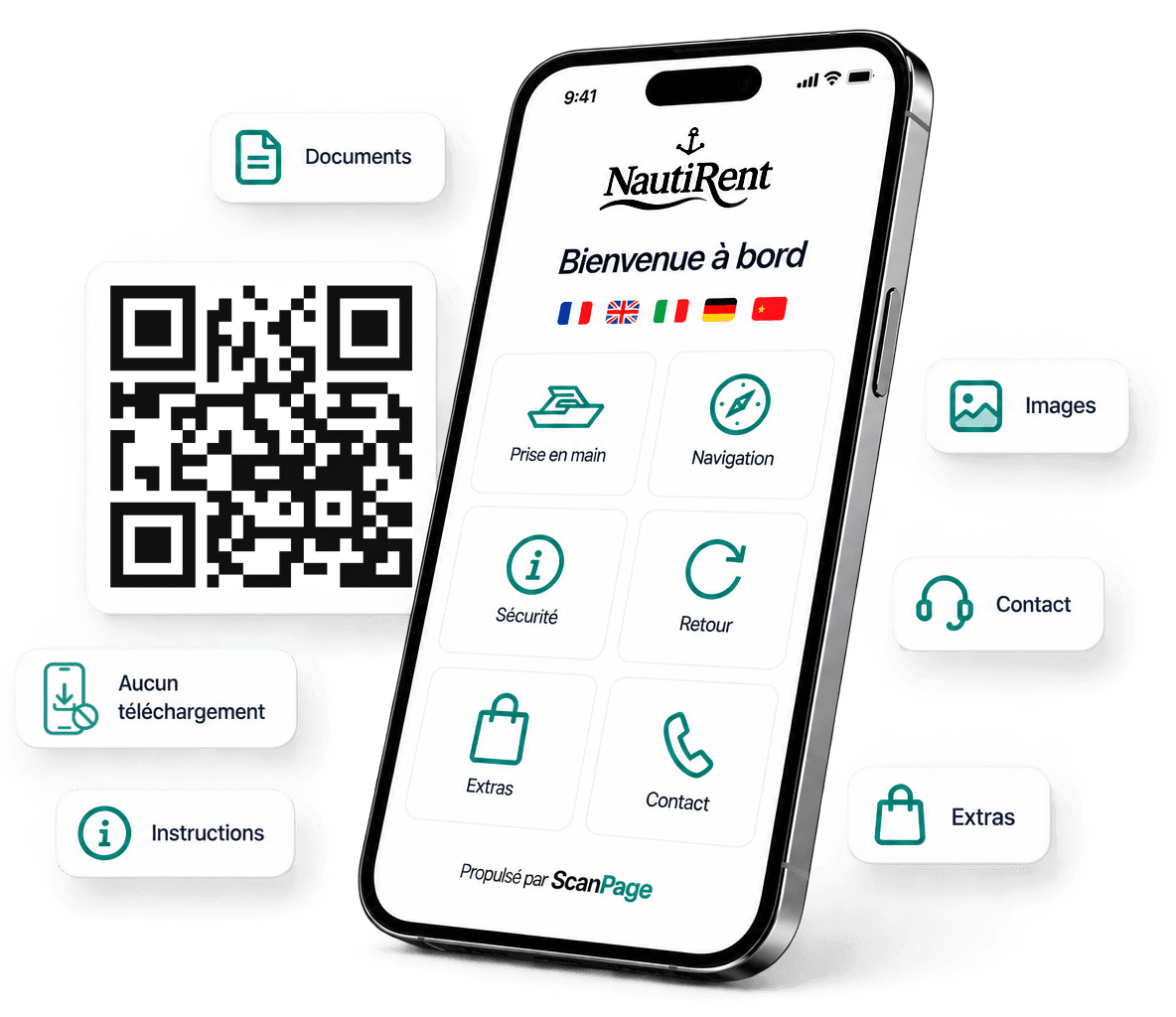
QR code · One page · All the information

Turn any object, product or place into a
digital experience.

ScanPage lets you create information pages accessible in a single scan. Ideal for museums, industry, businesses and every professional.

14-day free trial
No credit card
Cancel anytime
Simple and fast
Create your page in minutes and generate your QR code.
Accessible everywhere
Your visitors get the information instantly, with no app.
Customizable
Match your pages to your brand with your content, colors and logo.
Analytics
Track your scans in real time and measure visitor engagement.
Secure and reliable
Hosted in Europe with top-tier security and availability.

ScanPage adapts to every sector

One QR code, endless possibilities

Museums & Culture

Museums & Culture

Showcase your works and objects with immersive content.

Industry & Machines

Industry & Machines

Deliver manuals, tutorials and technical info instantly.

Car rental

Car rental

Present your vehicles, options and practical information.

And much more

And much more

Events, healthcare, education, agriculture, retail, real estate…

Everything your visitors need

A simple, useful and memorable experience.

Instant access

One scan, and all the information is at hand.

Always up to date

Edit your page anytime, without reprinting the QR code.

No app

Your visitors scan and browse directly in their browser.

A polished image

A digital experience that elevates your brand.

ScanPage is extremely well thought out.
It's simple, effective, I love it!
D
Delphine
ScanPage customer · France

Getting started

Ready in five minutes,
for years to come.

01

Create your page

Add your info, enable the modules that fit you, customize the colors. Everything happens in a simple editor — no technical skills required.

Page editor
Overview
Documentation
Maintenance
Support
02

Display the QR code

Print your QR code once and display it on site or on your products. It never changes — even when you edit the content.

ScanPage demo QR
Permanent QR
Nothing to reprint
03

Your visitors scan

They access all the information, documents and services in an instant — no app, no sign-up.

Visitor page
Overview · Machine X200
Documentation · PDF manuals
Support · Contact us
Overview
Specs · Media
Documentation
Manuals · Datasheets
Location
Access · Hours · Info
Contact & support
Support · After-sales · Claims
Accessible in 2 seconds via QR code · No app

Information page

All your info,
in a single QR code.

Overview, documents, specs, contacts… Your visitors scan the QR code and find everything in seconds, without asking you.

Overview, specs, photos and videos
Documents, manuals and datasheets as PDF
Practical info, location and hours
Available 24/7, no app or sign-up

In real time

How is your experience going?

😊All good
😐Okay
😞I have a problem
Private message sent to your team

At the right moment

Thank you for your visit

Leave a Google review →

Visible to all your visitors, happy or not

Feedback & satisfaction

Capture feedback
at the right moment.

Your visitors can report a problem or ask a question in seconds. You react fast. A dedicated screen also invites them to share their review on Google.

Your visitors report a problem in real time
You step in before an issue escalates
The review request arrives at the right moment
The Google link is available to all your visitors

Services & requests

Your services,
a scan away.

Options, services and special requests — your visitors discover them on your page and contact you directly. You receive the request by email or WhatsApp, whichever you prefer.

Each service shown with description and availability
Request sent in seconds
Notification received by email or WhatsApp in real time
No app or account required

And to build loyalty

Offer an exclusive perk (discount, promo code) in exchange for the visitor's email. Synced to Brevo for your direct campaigns.

Contact request
Reply within 24h
How can we reach you?
PhoneReferenceEmail
Hi, I have a question about this product…

Notification received by email or WhatsApp

Automatic translation

Your visitors read
in their language.

One-click translation into 10 languages. Your visitors pick theirs when they open the page. Nothing to set up, always up to date.

Français
English
Español
Deutsch
Italiano
Nederlands
Português
Русский
中文
日本語

Demo

Scan it.
Feel the difference.

This QR code opens a real ScanPage — every feature active.

Overview, documents and practical info
Requests and direct contact
Visitor feedback and Google reviews
10 languages available
No app or sign-up
See an example
ScanPage demo QR

Scan from your phone

All included

A complete tool,
with no friction.

Feedback & satisfaction

Your visitors report a problem privately. A dedicated screen also invites a Google review.

10 languages by AI

EN, FR, ES, DE, IT, NL, PT, RU, ZH, JA. One-click translation, editable anytime.

Services & requests

Services and options — requests sent from the page, received by email.

Email capture + Brevo

Offer an exclusive perk in exchange for the email. Automatically synced to Brevo.

QR code + printable PDF

A permanent QR code. It never changes, even when you edit the content.

Documents & media

Add manuals, datasheets, photos and videos, as text or via a PDF link.

Info & location

Share addresses, access and useful links. Real added value for your visitors.

Unlimited edits

Update your info whenever you want. Nothing to reprint.

View statistics

How many times your page is viewed — by week and by month.

No app

Your visitors scan and read in their browser. Zero friction, zero download.

FAQ

Frequently asked questions.

What is ScanPage?
ScanPage lets you create an information page accessible by scanning a QR code: overview, documents, practical info, contacts and services — with no app to download. You build it in minutes and update it anytime.
Do my visitors need an app?
No. The page opens in the browser after scanning the QR code — Chrome, Safari, Samsung Internet, all iOS and Android phones. No download, no account required.
Which sectors is ScanPage suited to?
All of them. Museums, industry, vehicle rental, events, healthcare, education, agriculture, retail, real estate… As soon as you have an object, product or place to present, ScanPage adapts.
Do I have to enable every module?
No, you choose exactly what to show. Each module (overview, documents, services, reviews, contact…) can be turned on or hidden with one click.
Can I edit my page after creating it?
Yes, anytime and as often as you like. The QR code stays the same — nothing to reprint. You edit, save, and your visitors see the new version immediately.
How does the Google Reviews module work?
Two modes, your choice. By default: your visitors can report a problem privately — you react quickly. The page also shows an invitation to leave a Google review. A simplified mode is available: the Google link is shown permanently, without private feedback.
Does the AI translation update if I change my content?
Not automatically — you decide. After a significant change, you re-run the translation with one click from the Languages page. Only the languages you enabled are retranslated.
How does payment work?
After your 14-day free trial, you pay online by card or PayPal via Stripe and receive your invoice by email. Access is guaranteed as soon as payment is made.

Ready to start?

Your page online
in five minutes.

14 days free. No card. Your QR code ready today.

Create my ScanPage for free →

Free trial · Then an annual subscription, renewed automatically